+1 315 210 4488
 +91 99888 06489


August 20, 2026
Building a multi-vendor marketplace app requires three main platforms: a Customer App for browsing and buying, a Vendor Panel for managing products and orders, and an Admin Dashboard for managing the entire marketplace. Some startups begin with ready-made marketplace solutions for a faster launch, and some businesses opt for custom development to add unique features, payment flows, vendor management, and support complex business requirements. RichestSoft helps businesses build scalable, feature-rich marketplace apps tailored to specific needs.
If you are also interested in entering the industry, this post covers detailed information on how to build a multi-vendor marketplace app.
Launch a Custom Multi-Vendor Marketplace With RichestSoft.
Launch a Custom Multi-Vendor Marketplace With RichestSoft.
What Is a Multi-Vendor Marketplace App?
Multi-vendor marketplace apps are one-stop platforms for sellers and service providers. Instead of requiring merchants to run a single online store, the platform lets them list goods and services and sell to customers. Multi-vendor marketplace apps have a three-way ecosystem:
1. Platform
- Manages the platform, sets rules/policies
- Handles payments, disputes, and overall operations
- Earns through commissions, fees, and other revenue streams
2. Vendors/Sellers
- Register, create profiles/stores
- List products, manage inventory, fulfill orders
- Pay fees/commissions to the platform
3. Buyers/Customers
- Browse products across multiple vendors
- Make purchases, track orders, leave reviews
Popular Examples of Multi-Vendor Marketplace Apps
You can see this model in several well-known platforms:
Amazon
Independent sellers can list products and sell them to customers through Amazon Marketplace.
Etsy
Multiple independent sellers offer products through one marketplace, while Etsy provides the platform for buyers and sellers to connect.
eBay
Sellers can list products and sell them directly to buyers through the same platform.
Fiverr
Freelancers offer various services, while customers use the platform to find and purchase them.
Airbnb
Property owners list stays, while travelers use the platform to find and book them.
Business Model Of a Multi-Vendor Marketplace App
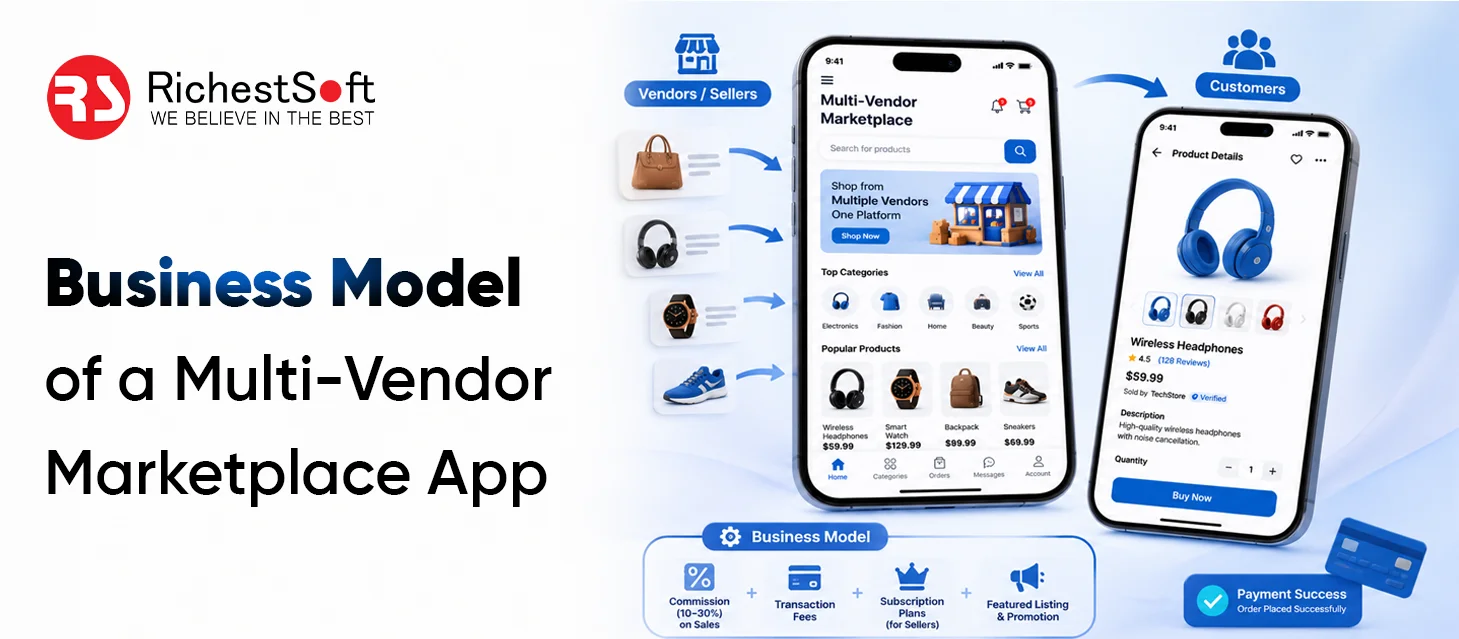
Understanding the business model of a multi-vendor marketplace app is key before investing in development, as it shapes your features, tech stack, and revenue strategy.
How Does a Multi-Vendor Marketplace App’s Business Model Work?
Explore below to understand how the business model of a multi-vendor marketplace works:
The vendors join the platform:
Then sellers register accounts, set up their stores, and add their products or services with prices and other details.
Customers browse and search:
Buyers can view items or services from multiple sellers, compare options, and choose the one they need.
The customer places an order:
If the customer can find the correct goods or service, they can buy or book it through the platform.
Payments are handled:
After charging the commission or fee, the marketplace accepts payment and automatically splits it between the vendor and platform.
Vendors control their own sales:
Sellers can manage goods, prices, stock, orders, and fulfillment from their own dashboard.
Platform-generates revenue:
Commissions, vendor subscriptions, listing fees, or sponsored promotions can create revenue for the marketplace.
Admin controls the marketplace:
The Owner governs suppliers, consumers, payments, commissions, listings, and other platform activities.
Revenue Stream of Multi-Vendor Marketplace App
1. Commission on Every Sale
The most common way marketplaces earn money.
- Vendor sells a product through your platform
- You keep a small percentage of the sale
- The remaining amount goes to the vendor
- Your revenue grows as vendor sales grow
2. Vendor Subscription Plans
Charge vendors a monthly or yearly fee to use your platform.
- Vendors pay for platform access.
- Different plans offer different features.
- Premium plans include extra tools or higher visibility
- Gives your business more predictable income
3. Product Listing Fees
Vendors pay a small fee to list their products.
- Vendors pay when adding a listing.g
- Offer free listings with paid upgrades
- Works well for marketplaces with many products
- Helps reduce low-quality or unnecessary listings
4. Featured Listings and Promotions
Vendors pay to make their products more visible.
- Products appear at the top of search results
- Vendors can promote products on the homepage
- Sponsored listings help sellers reach more customers
- Marketplace earns from these promotional placements
5. Customer or Service Fees
Add a small fee to customer orders or bookings.
- A fixed fee added at checkout.
- Covers platform or service costs
- Works well for marketplaces with frequent transactions
- Can be used alongside vendor commissions
6. Advertising Revenue
Once you have enough users, offer advertising opportunities.
- Vendors can promote their products
- Brands can display ads to relevant customers
- Businesses pay for banners or sponsored placements
- Becomes an additional revenue source as traffic grows
7. Hybrid Revenue Model
Many marketplaces combine multiple revenue methods instead of relying on just one — for example, sales commissions + vendor subscriptions + featured listings. Starting with one simple model and adding more streams as the marketplace grows makes the business easier to manage.
Types of Multi-Vendor Marketplace Models
- B2C (Business-to-Consumer): Vendors sell directly to customers (e.g., Amazon)
- B2B (Business-to-Business): Businesses sell to other businesses (e.g., Alibaba)
- C2C (Consumer-to-Consumer): Individuals sell to individuals (e.g., eBay, Etsy)
- Hybrid model: Platform sells its own products alongside vendor products
Why This Model Works
- Low inventory risk: You don’t hold stock — vendors do
- Scalability: More vendors = more products = more customers, without proportional cost increase
- Diverse revenue streams: Multiple ways to monetize beyond just commissions
- Network effect: More vendors attract more buyers, and vice versa
Features to Include in a Multi-Vendor Marketplace App
A successful marketplace needs features for customers, vendors, and administrators. Each side should have simple tools to complete their tasks.
Customer Registration and Profiles
Customers should be able to create accounts and manage their information.
- Simple registration and login
- Profile management
- Saved addresses
- Order history
- Wishlist
Vendor Registration and Store Management
Vendors need their own space to manage their business.
- Vendor registration
- Store profile
- Product uploads
- Product pricing
- Inventory management
- Order management
Product Search and Filters
Customers should be able to find products quickly.
- Search bar
- Categories
- Filters
- Price range
- Sorting options
Shopping Cart and Checkout
A simple checkout process makes it easier for customers to complete purchases.
- Add or remove products
- Review order
- Select delivery address
- Apply coupons
- Confirm payment
Multiple Payment Options
The app should support secure payment methods based on the target market.
- Credit and debit cards
- Digital wallets
- Bank transfers
- Payment gateways
- Cash on delivery, where applicable
Order and Delivery Tracking
Customers should know what is happening with their orders.
- Order confirmation
- Order status
- Delivery updates
- Estimated delivery time
- Tracking information
Ratings and Reviews
Reviews help customers make better buying decisions.
- Product ratings
- Vendor ratings
- Written reviews
- Review management
Notifications
Push notifications can keep users and vendors updated.
- Order updates
- Payment alerts
- New offers
- Delivery notifications
- Vendor updates
Admin Dashboard
The admin needs complete control over the marketplace.
- Manage customers
- Manage vendors
- Approve products
- Monitor orders
- Manage payments
- View sales reports
- Manage commissions
- Handle disputes
Step-by-Step Development Process for a Multi-Vendor Marketplace App
Explore these steps to build a Multi-Vendor Marketplace App:
1. Decide What Your Marketplace Will Be
Before development starts, get clear on what you want to sell and who will use your platform.
- Choose your marketplace type — products, services, rentals, or B2B
- Decide who your customers and vendors will be
- Decide how vendors will add and sell their products or services
- Choose how your marketplace will earn money
- Check similar platforms to see what they offer and where you can do better
2. Plan User Flow
A multi-vendor marketplace has three main users — customers, vendors, and admins. Each needs a simple, clear process.
- Decide how the customers will register, search, order, pay, and submit reviews.
- Devise a vendor registration, product listing, order acceptance, and payment management plan.n
- Decide how admins will approve suppliers, maintain listings, track orders, and troubleshoot
- Plan how to deal with cancellations, refunds, and disputes
3. Finalize the MVP Features
You don’t need to build every possible feature at the beginning. Start with the features needed to make the marketplace work.
- Customer registration and product search
- Vendor registration and listing management
- Cart and checkout
- Payments and commissions
- Order management
- Ratings and reviews
- Basic admin controls
Advanced features can be added after the first version is launched and tested with real users.
4. Design the App and Dashboards
Create the design for each side of the marketplace before development starts.
- Design the customer app for easy browsing and checkout.
- Create a simple vendor dashboard.
- Design the admin panel for easy platform management.
- Build wireframes for important user journeys.
- Test the basic flow before moving into full development.
5. Build the Marketplace Platform
Now the development team is starting to build the actual platform.
- Develop the customer-facing app or website.
- Build the vendor panel or app.
- Develop the admin dashboard.
- Set up the backend and database.
- Connect payment, notification, search, and other required services.
- Make sure vendor data and customer data remain properly separated.
6. Add Payments, Commissions, and Vendor Payouts
Money flow is an important part of marketplace development.
- Connect the required payment gateway.
- Set commission rules.
- Calculate the marketplace’s share automatically.
- Track vendor earnings.
- Set up vendor payouts.
- Handle refunds and canceled orders.
7. Test the Complete Marketplace
Testing should cover the full journey, not just individual screens.
- Test customer registration and login.
- Check vendor onboarding and product uploads.
- Test search, cart, and checkout.
- Check payments and commissions.
- Test order updates and notifications.
- Check refunds and other important cases.
- Test the app across different devices and screen sizes.
8. Launch and Onboard Vendors
Once the platform is tested, prepare it for real users.
- Publish the app or website.
- Add your branding and marketplace policies.
- Onboard your first group of vendors.
- Check their listings before they go live.
- Start marketing to attract customers.
- Monitor the first orders closely.
9. Improve the Marketplace After Launch
Development doesn’t stop when the app goes live. Early customer and vendor feedback can show you what needs to change.
- Fix bugs and performance issues.
- Improve confusing user flows.
- Add features based on actual user needs.
- Track sales, orders, and vendor activity.
- Improve search and recommendations.
- Scale the platform as users and transactions increase.
Launch a Custom Multi-Vendor Marketplace With RichestSoft.
Launch a Custom Multi-Vendor Marketplace With RichestSoft.
Conclusion
Ready to Build Your Own Multi-Vendor Marketplace App? Team up with RichestSoft! We help businesses build custom marketplace apps with the expertise needed to deliver the best marketplace app development solutions, managing the entire development process—from planning and UI/UX design to development, testing, and deployment.